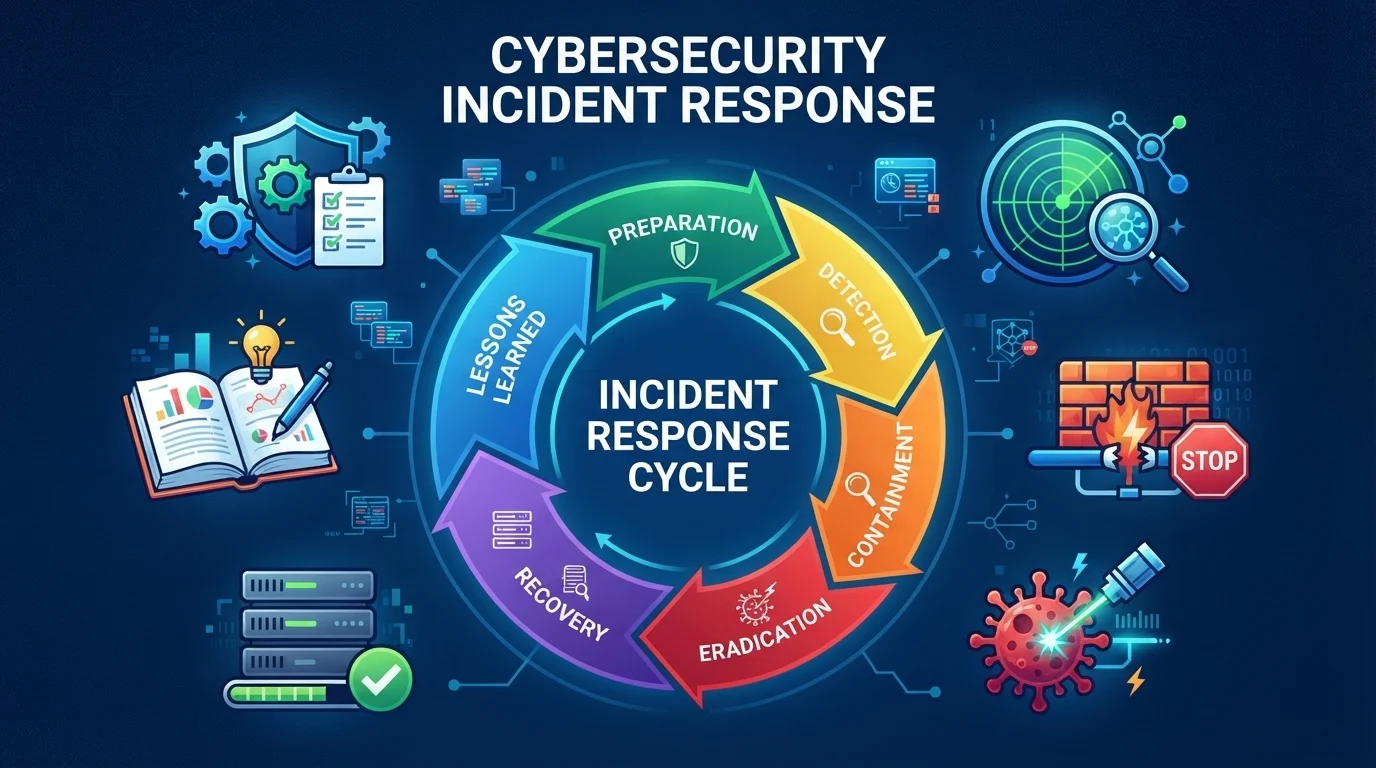
The incident response cycle is a structured loop of preparing, detecting, containing, eradicating, recovering, and learning from security incidents. Top alternatives to remember: Preparation, Identification, Containment, Eradication, Recovery.
Every security team eventually faces that 2 a.m. alert. The incident response cycle is your playbook for staying calm when everything feels on fire. It matters because chaos costs money, trust, and sleep.
A strong cycle turns panic into process. Whether you are a solo IT hero or part of a global SOC, the right steps save you. This guide breaks down 150+ actions across 15 phases and mindsets.
Use them to build a cycle that actually works. From preparation to lessons learned, these bullet-style ideas help you respond faster and smarter.
Preparation Phase Actions
- Build an incident response team with clear roles. Example: Assign a lead, scribe, and communications point person before anything happens. Meaning: It removes confusion when the clock is ticking.
- Create a written incident response plan. Example: Store it where everyone can access it during an emergency. Meaning: It gives the team a single source of truth.
- Run tabletop exercises every quarter. Example: Simulate a ransomware attack with your team in a conference room. Meaning: It exposes gaps before real attackers do.
- Maintain an up-to-date asset inventory. Example: Know every server, laptop, and cloud instance you own. Meaning: You cannot protect what you cannot see.
- Set up a dedicated incident response channel. Example: Use a Slack or Teams channel only for active incidents. Meaning: It keeps noise away from critical updates.
- Pre-approve emergency budgets. Example: Give the incident lead authority to spend on tools or forensics. Meaning: It removes approval delays during a crisis.
- Document contact trees for key stakeholders. Example: List legal, PR, and executive contacts with phone numbers. Meaning: It speeds up notifications when minutes matter.
- Test your backups regularly. Example: Restore a random file from backup every month. Meaning: It proves your recovery plan is not just theory.
- Define severity levels clearly. Example: Label incidents as low, medium, high, or critical with examples. Meaning: It helps teams prioritize without debate.
- Train employees on phishing and reporting. Example: Run monthly phishing simulations with instant feedback. Meaning: It turns every user into a sensor.
- Keep an offline copy of your playbook. Example: Print the first 10 pages and store them in a safe. Meaning: It works even when your network is down.
- Review third-party vendor contacts. Example: Know who to call at your cloud provider or MSP. Meaning: It avoids finger-pointing during an outage.
Identification and Detection Actions
- Monitor alerts around the clock. Example: Use a SIEM or SOC to watch for unusual login attempts. Meaning: It catches incidents before they spread.
- Triage every alert by severity. Example: Investigate failed admin logins before marketing email spikes. Meaning: It focuses energy on real threats.
- Validate incidents with multiple sources. Example: Confirm a malware alert with endpoint logs and network traffic. Meaning: It reduces false positives.
- Use threat intelligence feeds. Example: Check if an IP address is linked to known attacks. Meaning: It adds context to raw alerts.
- Ask users for quick reports. Example: Create a one-click “report phish” button in email. Meaning: It speeds up human detection.
- Watch for unusual outbound traffic. Example: Flag a server sending data to an unknown country. Meaning: It can reveal data exfiltration.
- Monitor privileged account activity. Example: Alert when a domain admin logs in at 3 a.m. Meaning: It catches credential misuse.
- Correlate alerts across tools. Example: Link antivirus, firewall, and cloud logs in one view. Meaning: It turns separate dots into a clear picture.
- Set baselines for normal behavior. Example: Know your average login times and data transfers. Meaning: It makes anomalies obvious.
- Review logs from critical systems daily. Example: Check authentication logs on your main database. Meaning: It catches slow-burn attacks.
- Use honeypots or decoy accounts. Example: Place a fake admin account and alert on any login. Meaning: It gives early warning of intruders.
- Document every detection step. Example: Note timestamps, tools, and findings in a shared doc. Meaning: It creates a timeline for later review.
Scoping and Triage Actions
- Determine how many systems are affected. Example: Count infected endpoints and compromised accounts. Meaning: It defines the blast radius.
- Identify the initial entry point. Example: Trace back to a phishing email or exposed VPN. Meaning: It stops the attacker from returning.
- Classify the incident type. Example: Label it as malware, insider threat, DDoS, or data breach. Meaning: It guides the right playbook.
- Assign a severity score. Example: Rate it critical if customer data is at risk. Meaning: It sets the response tempo.
- Check for data exfiltration signs. Example: Look for large uploads to unknown cloud storage. Meaning: It reveals what was stolen.
- Map affected business processes. Example: See if payroll or checkout systems are down. Meaning: It helps leaders understand impact.
- Identify patient zero. Example: Find the first user who clicked the malicious link. Meaning: It narrows the investigation.
- Look for lateral movement. Example: Check if the attacker moved from IT to finance. Meaning: It prevents deeper damage.
- Assess third-party involvement. Example: See if a vendor account was used in the attack. Meaning: It brings partners into the response.
- Set a scope freeze. Example: Stop all non-essential changes to affected systems. Meaning: It preserves evidence and stability.
- Brief the incident lead immediately. Example: Send a one-page summary with severity and scope. Meaning: It enables fast decisions.
- Update the ticket with scope details. Example: Add affected IPs, users, and timestamps. Meaning: It keeps everyone aligned.
Containment Phase Actions
- Isolate infected machines from the network. Example: Unplug Ethernet or disable Wi-Fi on a compromised laptop. Meaning: It stops the spread.
- Disable compromised user accounts. Example: Lock the account that attackers used to log in. Meaning: It cuts off access.
- Block malicious IPs and domains. Example: Add attacker IPs to your firewall deny list. Meaning: It prevents command-and-control traffic.
- Segment critical networks. Example: Move finance servers to a separate VLAN during an incident. Meaning: It limits lateral movement.
- Apply emergency patches. Example: Patch the vulnerability the attacker exploited. Meaning: It closes the door behind you.
- Reset credentials for affected users. Example: Force password changes for everyone in the breach scope. Meaning: It invalidates stolen passwords.
- Preserve evidence before wiping. Example: Take a forensic image of the infected disk first. Meaning: It supports later investigation.
- Use temporary workarounds. Example: Route traffic through a clean proxy while fixing the main path. Meaning: It keeps business running.
- Communicate containment status. Example: Post updates in the incident channel every 30 minutes. Meaning: It keeps stakeholders calm.
- Monitor for re-entry attempts. Example: Watch for the attacker trying new credentials. Meaning: It confirms containment is holding.
- Document every containment action. Example: Log who isolated which machine and when. Meaning: It creates an audit trail.
- Get approval for destructive actions. Example: Ask the incident lead before wiping a server. Meaning: It avoids costly mistakes.
Eradication Phase Actions
- Remove malware from all affected systems. Example: Run a trusted cleaner or reimage the machine. Meaning: It eliminates the threat.
- Delete malicious files and scripts. Example: Find and remove the backdoor script in the startup folder. Meaning: It stops persistence.
- Close the initial vulnerability. Example: Fix the unpatched software or misconfigured firewall. Meaning: It prevents reinfection.
- Revoke stolen tokens and keys. Example: Invalidate API keys the attacker may have copied. Meaning: It cuts off silent access.
- Rebuild compromised systems from scratch. Example: Reinstall the OS from a known good image. Meaning: It removes hidden implants.
- Update detection rules. Example: Add a new signature for the malware you just found. Meaning: It catches future variants.
- Check for scheduled tasks and cron jobs. Example: Look for attacker-created jobs that restart malware. Meaning: It removes hidden persistence.
- Review admin groups and permissions. Example: Remove unauthorized accounts from domain admins. Meaning: It restores proper access control.
- Scan for web shells on public servers. Example: Search for suspicious PHP files on your website. Meaning: It finds common backdoors.
- Validate eradication with a second scan. Example: Run a full endpoint scan after cleanup. Meaning: It confirms the threat is gone.
- Update the incident log. Example: Note what was removed and when. Meaning: It supports post-incident review.
- Get sign-off before recovery. Example: Have the incident lead confirm eradication is complete. Meaning: It prevents premature return to normal.
Recovery Phase Actions
- Restore systems from clean backups. Example: Recover the database from last night’s backup. Meaning: It brings services back safely.
- Bring systems back in stages. Example: Start with internal tools, then customer-facing apps. Meaning: It reduces risk of re-compromise.
- Monitor recovered systems closely. Example: Watch for unusual behavior for 72 hours. Meaning: It catches lingering threats.
- Test functionality after restore. Example: Verify login, payments, and email work correctly. Meaning: It confirms full recovery.
- Communicate recovery timeline. Example: Tell users when services will be back online. Meaning: It manages expectations.
- Keep a rollback plan ready. Example: If a restored server fails, switch back to the old one. Meaning: It avoids prolonged outages.
- Update passwords again if needed. Example: Force a second reset after recovery. Meaning: It adds a layer of safety.
- Re-enable security controls. Example: Turn firewalls and endpoint protection back to full blocking mode. Meaning: It restores your defenses.
- Confirm data integrity. Example: Check that restored files are not corrupted. Meaning: It ensures trust in recovered data.
- Document recovery steps. Example: Record exactly how each system was restored. Meaning: It helps future incidents.
- Notify stakeholders of recovery. Example: Send a short email that services are back. Meaning: It closes the communication loop.
- Schedule a post-recovery check. Example: Plan a review 48 hours after recovery. Meaning: It catches issues that appear later.
Lessons Learned and Post-Incident Actions
- Hold a blameless post-mortem. Example: Meet within one week of closing the incident. Meaning: It encourages honesty.
- Create a timeline of events. Example: List detection, containment, and recovery times. Meaning: It shows where delays happened.
- Identify what worked well. Example: Praise the engineer who spotted the anomaly. Meaning: It reinforces good behavior.
- Find root causes, not just symptoms. Example: Ask why the vulnerability existed for months. Meaning: It prevents repeats.
- Assign action items with owners. Example: Give the patch team a deadline to fix the server. Meaning: It turns lessons into change.
- Update the incident response plan. Example: Add the new attack pattern to your playbook. Meaning: It keeps the cycle fresh.
- Train the team on gaps. Example: Run a mini-workshop on the missed detection. Meaning: It builds skills.
- Share anonymized lessons. Example: Present findings to other teams without naming victims. Meaning: It spreads awareness.
- Measure response metrics. Example: Track mean time to detect and mean time to contain. Meaning: It shows improvement.
- Review vendor performance. Example: Check if your MSP responded fast enough. Meaning: It holds partners accountable.
- Celebrate the team. Example: Order pizza after a tough incident. Meaning: It boosts morale.
- Schedule the next test. Example: Plan a tabletop for next quarter. Meaning: It keeps the cycle active.
Communication and Notification Actions
- Designate a single spokesperson. Example: Let one person talk to the press. Meaning: It avoids mixed messages.
- Prepare holding statements. Example: Write a generic “we are investigating” email in advance. Meaning: It buys time.
- Notify legal and compliance early. Example: Tell legal within one hour of a data breach. Meaning: It meets regulatory deadlines.
- Inform affected customers honestly. Example: Send a clear email about what happened and what to do. Meaning: It builds trust.
- Use plain language. Example: Avoid jargon like “exfiltration vector” in public updates. Meaning: It keeps everyone informed.
- Set a communication cadence. Example: Update every hour during critical incidents. Meaning: It reduces uncertainty.
- Create an internal FAQ. Example: Give employees answers to common questions. Meaning: It stops rumors.
- Coordinate with PR. Example: Align technical facts with public messaging. Meaning: It protects reputation.
- Document all communications. Example: Save every email, tweet, and press release. Meaning: It supports legal review.
- Check regulatory requirements. Example: Know if GDPR or HIPAA requires notification. Meaning: It avoids fines.
- Use secure channels for sensitive details. Example: Share victim data only in encrypted chat. Meaning: It protects privacy.
- Close the loop after resolution. Example: Send a final update when the incident is fully closed. Meaning: It gives closure.
Documentation and Evidence Actions
- Start an incident log immediately. Example: Open a shared doc at the first alert. Meaning: It captures real-time details.
- Record timestamps in UTC. Example: Note 14:32 UTC instead of local time. Meaning: It avoids confusion across teams.
- Take screenshots of alerts. Example: Capture the SIEM dashboard before it changes. Meaning: It preserves visual evidence.
- Hash forensic images. Example: Generate SHA-256 hashes for disk copies. Meaning: It proves evidence integrity.
- Store evidence securely. Example: Keep forensic images on an encrypted drive. Meaning: It prevents tampering.
- Document chain of custody. Example: Log who accessed each evidence file and when. Meaning: It makes evidence admissible.
- Keep a decision log. Example: Note why you isolated a server at 3 a.m. Meaning: It explains choices later.
- Save relevant emails and chats. Example: Export the phishing email that started it all. Meaning: It shows the attack vector.
- Use a consistent naming convention. Example: Name files “INC-2026-001_disk_image”. Meaning: It keeps evidence organized.
- Back up the incident log. Example: Store a copy in the cloud and on a local drive. Meaning: It prevents data loss.
- Review documentation before closing. Example: Check that all fields are filled. Meaning: It ensures completeness.
- Archive everything after resolution. Example: Move files to a long-term evidence folder. Meaning: It supports future audits.
Coordination and Teamwork Actions
- Define clear roles during the incident. Example: Assign lead, scribe, and comms person. Meaning: It stops overlap.
- Use a single incident channel. Example: Keep all chat in one Slack channel. Meaning: It centralizes information.
- Hold short stand-ups. Example: Meet every 30 minutes for a 2-minute update. Meaning: It keeps everyone aligned.
- Escalate blockers fast. Example: If you need budget approval, say so immediately. Meaning: It prevents stalls.
- Share a live timeline. Example: Pin a Google Doc with all events. Meaning: It gives everyone the same picture.
- Respect the incident lead. Example: Let one person make final calls. Meaning: It avoids chaos.
- Bring in specialists early. Example: Call forensics when malware is involved. Meaning: It speeds up resolution.
- Coordinate with IT operations. Example: Align containment with change management. Meaning: It avoids breaking production.
- Include HR if insider threat. Example: Loop in HR before interviewing an employee. Meaning: It follows policy.
- Update executives briefly. Example: Send a 3-bullet summary every hour. Meaning: It keeps leadership informed.
- Debrief together after closure. Example: Meet as a team to share lessons. Meaning: It builds trust.
- Thank everyone involved. Example: Send a shout-out in the team channel. Meaning: It boosts morale.
Legal and Compliance Actions
- Know your notification deadlines. Example: GDPR requires 72 hours for breaches. Meaning: It avoids penalties.
- Consult legal before public statements. Example: Get approval for any apology language. Meaning: It reduces liability.
- Preserve evidence for lawsuits. Example: Do not delete logs after an incident. Meaning: It protects your case.
- Review contracts with vendors. Example: Check if your cloud provider must notify you. Meaning: It clarifies responsibility.
- Document compliance decisions. Example: Note why you did or did not notify regulators. Meaning: It shows good faith.
- Follow industry regulations. Example: HIPAA, PCI-DSS, or SOX may apply. Meaning: It keeps you compliant.
- Involve privacy officers. Example: Ask them to review data exposure. Meaning: It protects customer rights.
- Consider law enforcement. Example: Report ransomware to the FBI or local cybercrime unit. Meaning: It may help recovery.
- Avoid admitting fault publicly. Example: Say “we are investigating” instead of “we messed up.” Meaning: It limits legal risk.
- Keep legal counsel in the loop. Example: Add them to the incident channel. Meaning: It speeds up advice.
- Review insurance coverage. Example: Check if cyber insurance covers forensics. Meaning: It reduces costs.
- Close with a legal sign-off. Example: Get approval before final report. Meaning: It ensures compliance.
Forensics and Investigation Actions
- Preserve memory before reboot. Example: Capture RAM from an infected server. Meaning: It reveals running malware.
- Analyze disk images in a sandbox. Example: Open the image in an isolated VM. Meaning: It prevents reinfection.
- Look for persistence mechanisms. Example: Check registry keys and startup folders. Meaning: It finds how attackers stay.
- Trace attacker commands. Example: Review PowerShell history. Meaning: It shows what they did.
- Identify tools used. Example: See if they used Cobalt Strike or Mimikatz. Meaning: It profiles the threat.
- Check for data staging. Example: Look for zip files in temp folders. Meaning: It reveals exfiltration prep.
- Analyze network traffic. Example: Review PCAP files for command-and-control. Meaning: It finds external contacts.
- Use timeline analysis. Example: Sort file timestamps to reconstruct events. Meaning: It builds a clear story.
- Correlate with threat intel. Example: Match attacker IPs to known groups. Meaning: It attributes the attack.
- Write a forensic report. Example: Summarize findings for non-technical leaders. Meaning: It informs decisions.
- Keep forensic copies. Example: Store images for at least one year. Meaning: It supports future legal needs.
- Validate findings with peers. Example: Have another analyst review your conclusions. Meaning: It reduces errors.
Threat Intelligence Actions
- Collect indicators of compromise. Example: Save malicious IPs, hashes, and domains. Meaning: It helps future detection.
- Share indicators with your sector. Example: Send IOCs to an ISAC. Meaning: It protects others.
- Subscribe to threat feeds. Example: Use free or paid feeds for real-time alerts. Meaning: It keeps you current.
- Enrich alerts with context. Example: Add geolocation and reputation to an IP. Meaning: It speeds triage.
- Track attacker tactics. Example: Note if they use phishing or valid accounts. Meaning: It guides defenses.
- Map to MITRE ATT&CK. Example: Tag each action with a technique ID. Meaning: It standardizes reporting.
- Monitor dark web mentions. Example: Check if your company data is for sale. Meaning: It gives early warning.
- Use threat hunting. Example: Proactively search for signs of hidden attackers. Meaning: It finds what alerts miss.
- Update detection rules from intel. Example: Add a new YARA rule for a malware family. Meaning: It improves coverage.
- Brief leadership on threat landscape. Example: Share a monthly one-pager. Meaning: It supports budget decisions.
- Collaborate with peers. Example: Join a trust group to share anonymized intel. Meaning: It strengthens everyone.
- Review intel after each incident. Example: Check if new intel explains what happened. Meaning: It improves future response.
Automation and Tooling Actions
- Automate alert triage. Example: Use SOAR to enrich and prioritize alerts. Meaning: It saves analyst time.
- Auto-isolate infected endpoints. Example: Let EDR quarantine a machine without human wait. Meaning: It stops spread faster.
- Use playbooks as code. Example: Store response steps in a Git repo. Meaning: It makes them repeatable.
- Automate evidence collection. Example: Trigger a script to grab logs and memory. Meaning: It preserves data quickly.
- Integrate tools via APIs. Example: Connect SIEM, EDR, and ticketing. Meaning: It reduces manual copying.
- Set up auto-notifications. Example: Ping the incident channel when severity is high. Meaning: It speeds awareness.
- Use chatops for commands. Example: Run “isolate host” from Slack. Meaning: It speeds containment.
- Test automations regularly. Example: Run a drill to see if the script works. Meaning: It avoids failures during real events.
- Keep human oversight. Example: Require approval for destructive automations. Meaning: It prevents mistakes.
- Document every automation. Example: Write a one-page guide for each tool. Meaning: It helps new team members.
- Measure automation impact. Example: Track time saved per incident. Meaning: It justifies investment.
- Review tooling after each incident. Example: Ask if the tools helped or hindered. Meaning: It drives improvement.
Continuous Improvement Actions
- Review metrics every month. Example: Track MTTD, MTTR, and recurrence rate. Meaning: It shows trends.
- Update playbooks quarterly. Example: Add new attack types you have seen. Meaning: It keeps them relevant.
- Run surprise drills. Example: Simulate an incident without warning the team. Meaning: It tests real readiness.
- Collect feedback from responders. Example: Ask what slowed them down. Meaning: It finds hidden gaps.
- Invest in training. Example: Send analysts to a forensics course. Meaning: It builds skills.
- Benchmark against peers. Example: Compare your response times to industry averages. Meaning: It sets goals.
- Automate repetitive tasks. Example: Turn a manual log pull into a script. Meaning: It frees up time.
- Improve communication templates. Example: Refine your holding statement. Meaning: It speeds future replies.
- Celebrate improvements. Example: Share a win when MTTD drops. Meaning: It motivates the team.
- Keep a lessons learned register. Example: Track every action item to completion. Meaning: It ensures follow-through.
- Review vendor contracts annually. Example: Check if SLAs still meet your needs. Meaning: It avoids surprises.
- Never stop testing. Example: Schedule the next tabletop before the current one ends. Meaning: It keeps the cycle alive.
FAQs
What is the incident response cycle?
It is a repeatable process for handling security incidents, from preparation to lessons learned.
Is the incident response cycle linear or circular?
It is circular. You loop back to preparation after every incident.
How often should we test our incident response cycle?
At least quarterly, with a full simulation once a year.
What happens if we skip a phase?
Skipping containment or lessons learned usually means the attacker returns or the same mistake repeats.
Can small teams use the incident response cycle?
Yes. Even a two-person IT team can follow a simple version of the cycle.
Conclusion
The incident response cycle is not just a checklist. It is a mindset that turns chaos into control. Every phase, from preparation to continuous improvement, shapes how fast you recover and how much you learn.
You do not need a massive budget to start. You need clear roles, honest communication, and a willingness to practice. Try one new action from this list this week. Save this guide, share it with your team, and keep building a cycle that works for you. Your future self will thank you.
