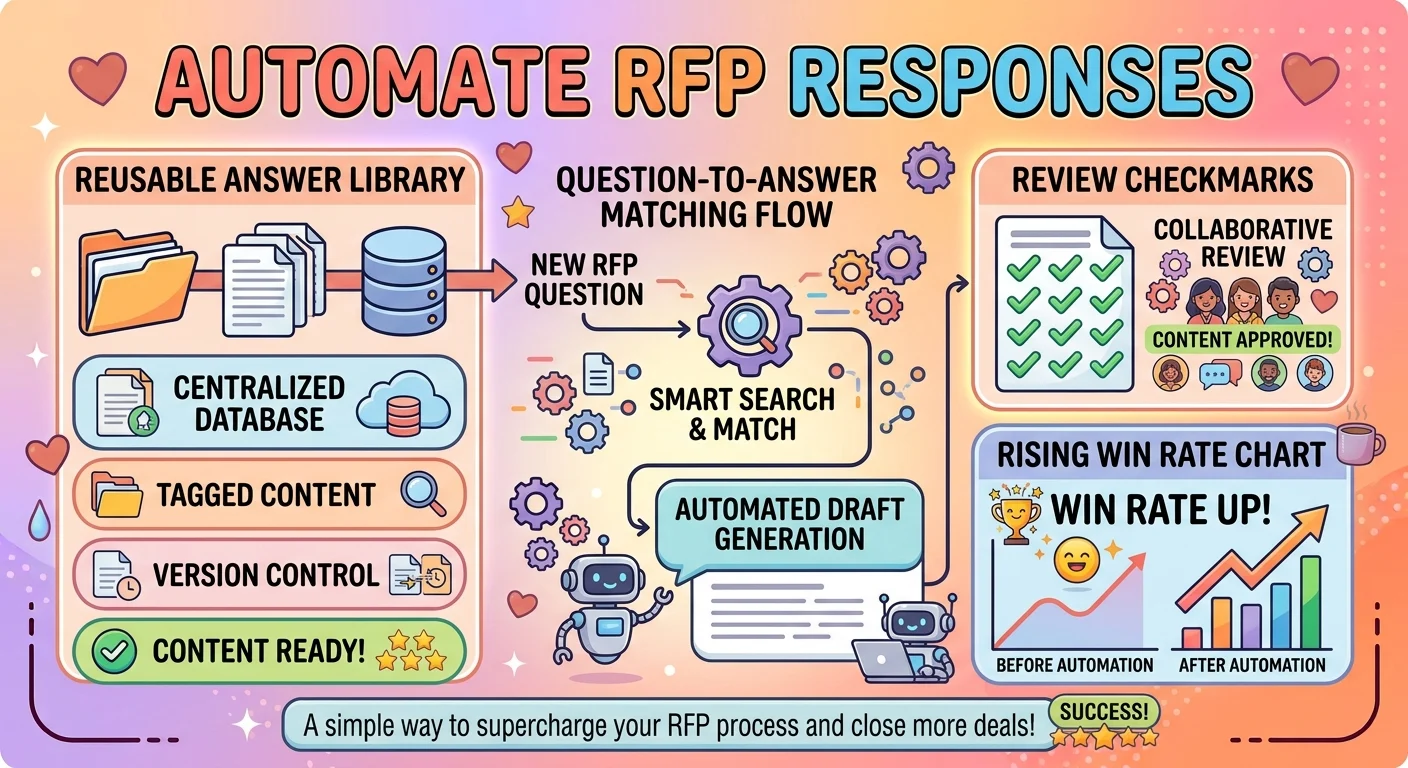
The fastest way to automate RFP responses is to build a reusable answer library, standardize intake with a questionnaire, map questions to approved content, assign clear owners and review gates, and track win rates so templates keep improving. Start with templates and a content library, then layer in workflow rules and reporting.
If you have ever answered the same RFP security question for the fifth time in one week, you already know why teams want to automate RFP responses. It is not about being lazy. It is about saving late nights, stopping copy paste errors, and giving sales back the hours they lose to formatting instead of selling.
The right automation setup turns scattered documents into a searchable library, standardizes how questions come in, and keeps approvals clean. Do it well and your proposals get faster, more consistent, and easier to defend. Do it poorly and you create a template graveyard. This guide gives you 180+ practical moves, sorted by tone and situation, so you can pick what fits your team today.
Quick Wins for Busy Teams
- Build a reusable answer library before you automate anything.
Example: When your team keeps rewriting the same company overview and security answers.
Meaning: It creates the source content every automation workflow depends on. - Create a master RFP intake questionnaire.
Example: When requests arrive as messy emails with missing deadlines and scope.
Meaning: It standardizes incoming information so responses start clean. - Tag every answer by topic, owner, and approval status.
Example: When you need to find the right legal or security answer fast.
Meaning: It makes your library searchable and auditable. - Write one approved boilerplate for your top 20 questions.
Example: When sales keeps improvising answers that legal later rejects.
Meaning: It reduces risk and speeds up drafting immediately. - Set a rule that no new answer enters the library without review.
Example: When a teammate adds a fresh claim that nobody checked.
Meaning: It protects consistency and compliance from day one. - Use a simple folder structure that mirrors your RFP sections.
Example: When your library has hundreds of files and no clear home.
Meaning: It keeps content findable as the library grows. - Create a short answer and a long answer for each key topic.
Example: When the same question appears in a strict form and a narrative proposal.
Meaning: It lets you reuse content without awkward trimming. - Add a last reviewed date to every library entry.
Example: When old pricing or compliance language sneaks into a new bid.
Meaning: It flags stale content before it reaches a client. - Make a one page style guide for RFP tone and formatting.
Example: When different writers produce wildly different sounding proposals.
Meaning: It keeps every automated answer on brand. - Assign a single owner for each RFP section.
Example: When everyone assumes someone else updated the security section.
Meaning: It creates accountability without adding meetings. - Set up a shared calendar for RFP deadlines.
Example: When two big bids land in the same week.
Meaning: It prevents deadline collisions before they happen. - Review your top five RFP questions every quarter.
Example: When customer priorities shift but your answers stay frozen.
Meaning: It keeps your library aligned with what buyers actually ask.
Professional Workflow Moves
- Map every RFP question to a library entry and an owner.
Example: When you want a clear chain from question to approved answer.
Meaning: It turns a pile of documents into a managed process. - Create a standard review sequence for legal, security, and finance.
Example: When approvals bounce between teams with no clear order.
Meaning: It reduces back and forth and shortens turnaround time. - Use a single source of truth for pricing language.
Example: When sales quotes one number and the proposal shows another.
Meaning: It prevents expensive inconsistencies. - Define a response deadline rule that includes review time.
Example: When the team starts writing two days before submission.
Meaning: It protects quality by planning backwards from the due date. - Build a compliance matrix template for every bid.
Example: When you need to prove every requirement was addressed.
Meaning: It makes coverage easy to check and easy to audit. - Create a standard kickoff checklist for new RFPs.
Example: When every project starts with a scramble for basic details.
Meaning: It brings repeatable structure to a chaotic process. - Assign a proposal manager for complex bids.
Example: When multiple experts contribute and nobody owns the final document.
Meaning: It keeps the workflow moving and the quality consistent. - Use a shared status tracker for every open RFP.
Example: When leadership asks where each bid stands.
Meaning: It gives everyone one place to check progress. - Standardize file naming for drafts, reviews, and finals.
Example: When you have five files called final_final_v3.
Meaning: It removes confusion and version mistakes. - Set review gates before formatting and before submission.
Example: When errors are caught after the document is polished.
Meaning: It catches problems while fixes are still cheap. - Document your workflow so new team members can follow it.
Example: When a key person leaves and nobody knows the process.
Meaning: It makes the operation resilient and easier to scale. - Measure turnaround time for every RFP stage.
Example: When you need to prove where delays actually happen.
Meaning: It turns process improvement into a data conversation.
Funny Sanity Savers
- Create a “greatest hits” folder for answers you reuse constantly.
Example: When you can recite the security answer from memory.
Meaning: It makes repeat work feel less like groundhog day. - Name your template files like they are episodes of a show.
Example: When your library is boring and nobody wants to open it.
Meaning: It adds personality without breaking the process. - Write a rule called “no copy pasta without checking the client name.”
Example: When a proposal accidentally includes another company’s name.
Meaning: It turns a painful mistake into a memorable guardrail. - Add a note that says “yes, we really do need this again.”
Example: When a client asks for the same document three times.
Meaning: It sets expectations with humor and keeps the team calm. - Create a “questions we are tired of answering” list and automate it first.
Example: When the same five questions show up in every bid.
Meaning: It focuses effort where the payoff is highest. - Label your emergency template folder “break glass in case of deadline.”
Example: When a bid lands with 24 hours to respond.
Meaning: It makes fast starts easier and less stressful. - Add a comment in the template reminding people to breathe.
Example: When the team is spiraling over a tight submission window.
Meaning: It injects a little humanity into a high pressure task. - Keep a running list of weirdest RFP questions received.
Example: When the team needs a laugh after a long week.
Meaning: It builds camaraderie and highlights gaps in your library. - Use a “copy, don’t rewrite” rule for approved answers.
Example: When someone tries to paraphrase a legal answer.
Meaning: It prevents creative edits that create risk. - Create a “template of the month” spotlight in team chat.
Example: When the library is growing and people forget what exists.
Meaning: It encourages adoption without a formal training session. - Name your review checklist “the adult supervision list.”
Example: When reviewers keep skipping the same checks.
Meaning: It makes the process memorable and harder to ignore. - Celebrate every bid that goes out without an all nighter.
Example: When the team finally finishes before midnight.
Meaning: It reinforces the behavior you want to repeat.
Confident Power Moves
- Set a non negotiable rule that every answer comes from the library.
Example: When a senior seller wants to freestyle a risky claim.
Meaning: It enforces consistency without debate. - Give every RFP a clear go or no go decision early.
Example: When the team chases every bid regardless of fit.
Meaning: It protects resources for winnable opportunities. - Own the intake process so late information does not derail drafts.
Example: When missing details arrive after writing has started.
Meaning: It keeps the timeline under control. - Define your turnaround promise and defend it.
Example: When a client expects a full proposal in one day.
Meaning: It sets boundaries that protect quality. - Require a single final approver before submission.
Example: When too many people are editing at the last minute.
Meaning: It prevents conflicting changes and confusion. - Use a standard executive summary template for every bid.
Example: When the opening section is rewritten from scratch each time.
Meaning: It saves time while keeping a polished first impression. - Assign backup owners for every critical section.
Example: When the primary writer is on leave during a deadline.
Meaning: It removes single points of failure. - Track every change request on an active bid.
Example: When scope shifts after writing begins.
Meaning: It keeps the team aligned and prevents surprise rework. - Require a coverage check before any proposal leaves the team.
Example: When one requirement quietly goes unanswered.
Meaning: It catches gaps before the client does. - Make win loss reviews a standard part of the process.
Example: When the same weaknesses keep appearing in feedback.
Meaning: It turns every bid into a learning opportunity. - Keep a short list of differentiators that must appear in every response.
Example: When writers forget the strongest proof points.
Meaning: It keeps your best selling points consistent. - Automate reminders for every review gate.
Example: When reviewers forget a deadline and the bid slips.
Meaning: It keeps the process moving without manual follow ups.
Clever Shortcuts
- Bookmark your most used answers for one click access.
Example: When you answer the same compliance question weekly.
Meaning: It cuts search time down to seconds. - Build a question to answer lookup table in a simple spreadsheet.
Example: When your library is large but poorly indexed.
Meaning: It turns a slow search into a fast match. - Create short codes for common sections and paste them into drafts.
Example: When you need to drop in a standard company overview quickly.
Meaning: It speeds drafting without losing structure. - Use a checklist instead of a long process document.
Example: When nobody reads the full workflow guide.
Meaning: It increases adoption by keeping things simple. - Keep a one paragraph summary of every long answer.
Example: When a form only allows a short text box.
Meaning: It gives you an instant short version without rewriting. - Create a “top 50 questions” starter library before expanding.
Example: When you are building from zero and feel overwhelmed.
Meaning: It delivers value fast and grows naturally. - Group similar questions so one answer can serve several forms.
Example: When three clients ask about data retention in different words.
Meaning: It increases reuse and reduces duplicate work. - Save a blank proposal shell with your standard sections ready.
Example: When every RFP needs the same basic structure.
Meaning: It removes repetitive formatting work. - Use find and replace carefully to swap client names and dates.
Example: When reusing a prior response for a similar buyer.
Meaning: It speeds edits while requiring a quick accuracy check. - Keep a swipe file of strong executive summaries.
Example: When you need inspiration for a new bid opening.
Meaning: It gives you proven language to adapt. - Create a short internal FAQ for where to find things.
Example: When new teammates keep asking for the same links.
Meaning: It reduces interruptions and speeds onboarding. - Set a five minute rule for library searches before asking a teammate.
Example: When quick questions interrupt deep work.
Meaning: It builds self sufficiency without wasting time.
Polite Team-Friendly Moves
- Ask reviewers for their preferred notice period and protect it.
Example: When legal needs two days but gets two hours.
Meaning: It builds trust and reduces last minute friction. - Create a shared document explaining who owns which RFP section.
Example: When people are unsure whether security or legal handles a question.
Meaning: It removes confusion without needing a meeting. - Use a polite standard note when requesting missing bid details.
Example: When a client sends an incomplete request.
Meaning: It keeps the tone professional while getting what you need. - Set up a group chat specifically for active RFP questions.
Example: When questions get buried in general team chatter.
Meaning: It keeps discussions focused and searchable. - Thank contributors publicly when a bid goes out on time.
Example: When several people pitched in during a busy week.
Meaning: It reinforces teamwork and makes future asks easier. - Create a no blame review process for catching mistakes.
Example: When someone spots an error after review.
Meaning: It encourages honesty and faster fixes. - Ask each owner for a realistic turnaround time and record it.
Example: When deadlines are set without checking capacity.
Meaning: It prevents overcommitment and protects quality. - Share a weekly summary of open RFPs with the whole team.
Example: When people only see their own tasks.
Meaning: It keeps everyone aligned without extra meetings. - Offer a short training session on using the library.
Example: When new hires keep building answers from scratch.
Meaning: It increases adoption and reduces duplicated effort. - Make it easy to suggest a new answer or update.
Example: When someone spots outdated content but has no way to flag it.
Meaning: It keeps the library improving from the ground up. - Set clear expectations for response time in team chat.
Example: When quick questions get lost in a flood of messages.
Meaning: It keeps collaboration efficient and respectful. - Use a shared glossary so everyone uses the same terms.
Example: When different teams name the same product feature differently.
Meaning: It prevents confusion and keeps responses consistent.
Chill Low-Stress Moves
- Start with one template and one library folder.
Example: When the idea of a full system feels too big.
Meaning: It makes automation feel achievable instead of overwhelming. - Automate the boring questions first.
Example: When you want quick relief from repetitive work.
Meaning: It delivers fast wins that build momentum. - Let the library grow as you go.
Example: When you do not have time to build everything upfront.
Meaning: It keeps progress steady without a big project. - Use a simple naming system and stick to it.
Example: When your files are a guessing game.
Meaning: It reduces daily friction with minimal effort. - Check the library once a week instead of daily.
Example: When you want to keep content fresh without obsessing.
Meaning: It creates a sustainable maintenance rhythm. - Keep a short list of what is working and what is not.
Example: When you want to improve without a formal review.
Meaning: It turns casual observation into useful feedback. - Set a reminder to update pricing language every quarter.
Example: When prices change but proposals still show old numbers.
Meaning: It prevents avoidable errors with one small habit. - Use a shared folder that everyone can access easily.
Example: When people cannot find the latest approved answers.
Meaning: It removes a common source of frustration. - Skip the fancy workflow until the basics are solid.
Example: When a complex setup is slowing the team down.
Meaning: It keeps the focus on useful progress. - Let one person own the library and keep it tidy.
Example: When content is scattered across too many drives.
Meaning: It creates a single point of responsibility without extra meetings. - Review one section per week instead of everything at once.
Example: When a full library audit feels impossible.
Meaning: It makes maintenance manageable and consistent. - Celebrate small time savings as real wins.
Example: When a bid takes two hours less than before.
Meaning: It keeps morale up and reinforces the habit.
Creative Customization Moves
- Build a modular answer system that mixes and matches sections.
Example: When each client needs a slightly different combination of content.
Meaning: It gives you flexibility without rewriting from scratch. - Create persona specific intros for different buyer types.
Example: When you sell to both technical and executive audiences.
Meaning: It keeps responses relevant without a full rewrite. - Use conditional text blocks for industry specific language.
Example: When the same answer needs a healthcare or finance angle.
Meaning: It makes one core answer work across several sectors. - Design a short and long version of your company story.
Example: When some forms allow 50 words and others allow 500.
Meaning: It gives you instant fit for any format. - Create a library of proof points that can be inserted anywhere.
Example: When you need a strong stat to support a claim.
Meaning: It adds credibility without extra research. - Build a set of standard case study snippets.
Example: When a buyer asks for relevant experience in a specific industry.
Meaning: It speeds up evidence gathering and keeps examples consistent. - Use color coding in your draft to show what is boilerplate and what is custom.
Example: When reviewers need to know what changed for this bid.
Meaning: It makes review faster and more focused. - Create a “choose your own ending” closing section.
Example: When different bids call for different next steps.
Meaning: It lets you customize the finish without starting over. - Build a one page capability summary that fits any RFP.
Example: When you need a fast attachment that covers the basics.
Meaning: It gives you a reusable asset for common requests. - Use a question bank organized by buyer concern.
Example: When you want to find answers by topic instead of department.
Meaning: It makes retrieval faster and more intuitive. - Create a visual library of approved charts and diagrams.
Example: When every proposal needs the same process graphic.
Meaning: It keeps visuals consistent and saves design time. - Add a “tone switch” note for formal versus conversational bids.
Example: When the same answer needs a different feel for a startup versus a bank.
Meaning: It keeps your voice flexible without rewriting everything.
Analytical Data-Driven Moves
- Track win rate by RFP source and question type.
Example: When you want to know which bids are worth pursuing.
Meaning: It shows where your effort pays off. - Log how often each library answer is used.
Example: When some answers are used weekly and others never.
Meaning: It tells you what to maintain and what to retire. - Measure time spent per RFP section.
Example: When one section always causes delays.
Meaning: It points to the biggest improvement opportunity. - Compare response length to win rate.
Example: When you suspect long answers are hurting readability.
Meaning: It reveals whether concision matters to buyers. - Tag losses with a reason code.
Example: When you want to spot patterns across failed bids.
Meaning: It turns feedback into actionable insight. - Track which questions appear most often.
Example: When you need to prioritize library updates.
Meaning: It focuses effort on the highest impact content. - Review win loss feedback every quarter.
Example: When buyers mention missing proof or unclear pricing.
Meaning: It keeps your templates aligned with reality. - Measure how often approved answers are edited before submission.
Example: When writers keep rewriting legal language.
Meaning: It shows whether your library is trusted. - Compare turnaround time before and after automation.
Example: When leadership asks if the new process is helping.
Meaning: It gives you concrete evidence of improvement. - Track which sections cause the most review comments.
Example: When one section always bounces back.
Meaning: It identifies content that needs a rewrite. - Score each bid for fit before investing time.
Example: When the team is tempted by every incoming request.
Meaning: It protects resources for the best opportunities. - Review your library usage monthly and remove dead content.
Example: When old answers clutter search results.
Meaning: It keeps the system fast and relevant.
Detail-Obsessed Accuracy Moves
- Require a source link for every factual claim in the library.
Example: When a certification or statistic needs verification.
Meaning: It makes every answer easy to defend. - Add an expiration date to time sensitive answers.
Example: When pricing, compliance, or product details change.
Meaning: It prevents outdated content from slipping through. - Run a coverage check against every RFP requirement.
Example: When one small requirement is easy to miss.
Meaning: It confirms every question has an answer. - Use a standard template for legal and security answers.
Example: When small wording changes create risk.
Meaning: It keeps high stakes content consistent. - Proofread client names, dates, and pricing before submission.
Example: When reusing a prior proposal with small edits.
Meaning: It catches the errors that damage credibility. - Keep a version history for every major answer.
Example: When you need to know what changed and why.
Meaning: It gives you an audit trail for reviews. - Check that every answer matches the question being asked.
Example: When a long answer drifts off topic.
Meaning: It keeps responses focused and useful. - Review the final document as a whole, not just section by section.
Example: When each part is fine but the full proposal repeats itself.
Meaning: It catches flow and consistency issues. - Use a checklist for formatting and branding before sending.
Example: When the content is strong but the document looks messy.
Meaning: It protects the professional impression. - Keep a list of banned claims and risky phrases.
Example: When writers use language legal has already rejected.
Meaning: It prevents repeat mistakes. - Have a second person review high value bids.
Example: When the deal is too important to risk a small error.
Meaning: It adds a layer of quality control. - Save final submitted versions in a dedicated archive.
Example: When you need to reference what was actually sent.
Meaning: It creates a reliable record for future bids.
Sales and Pursuit Strategy Moves
- Decide go or no go before the team starts writing.
Example: When a bid looks big but fits poorly with your strengths.
Meaning: It saves hours on opportunities you are unlikely to win. - Map each RFP to your strongest differentiators.
Example: When you want every response to reinforce your edge.
Meaning: It keeps the proposal focused on why you win. - Use a standard executive summary that leads with client outcomes.
Example: When the opening section needs to grab attention fast.
Meaning: It frames the bid around value instead of features. - Build a library of industry specific proof points.
Example: When a buyer wants evidence from their own sector.
Meaning: It makes relevance obvious without extra research. - Create a short list of questions to ask before bidding.
Example: When the team needs clarity on scope and timeline.
Meaning: It helps you qualify opportunities earlier. - Assign a pursuit lead for every major bid.
Example: When too many people are involved but nobody is driving.
Meaning: It keeps momentum and accountability. - Track competitive mentions and buyer priorities.
Example: When you want to tailor messaging to the evaluation criteria.
Meaning: It makes responses more targeted and persuasive. - Require a win theme for every proposal.
Example: When the draft reads like a generic brochure.
Meaning: It gives the response a clear strategic angle. - Review the scoring criteria before writing begins.
Example: When the buyer publishes a rubric.
Meaning: It helps you prioritize the sections that matter most. - Create a standard pricing narrative to pair with numbers.
Example: When the price table lacks context.
Meaning: It helps buyers understand value instead of just cost. - Debrief every major bid with the sales team.
Example: When you want to know what resonated and what fell flat.
Meaning: It turns each pursuit into better future content. - Keep a list of reasons buyers chose you.
Example: When you need fresh language for future proposals.
Meaning: It keeps your messaging grounded in real wins.
Small Team Budget-Friendly Moves
- Start with a shared drive and a clear folder structure.
Example: When you have no budget for new systems.
Meaning: It gives you a workable library with what you already have. - Use a single spreadsheet as your question and answer index.
Example: When you need a fast way to find approved content.
Meaning: It creates searchability without extra cost. - Assign library ownership to one person part time.
Example: When content updates are everyone’s job and nobody’s job.
Meaning: It keeps the system maintained without a new hire. - Build templates in the document editor you already use.
Example: When you want consistency without buying anything new.
Meaning: It keeps adoption easy and cost low. - Create a simple review rotation among team members.
Example: When there is no dedicated reviewer.
Meaning: It shares the load and improves quality. - Use a shared checklist for bid kickoff and submission.
Example: When small teams need to avoid missed steps.
Meaning: It brings structure without extra overhead. - Keep a top 30 questions library instead of a massive archive.
Example: When you want to focus on the highest impact content.
Meaning: It makes maintenance realistic for a small team. - Ask frequent clients which answers they value most.
Example: When you want to prioritize updates.
Meaning: It keeps your library aligned with buyer needs. - Set a simple rule for who can edit approved answers.
Example: When accidental edits create risk.
Meaning: It protects quality with minimal process. - Use a shared calendar for deadlines and reviews.
Example: When multiple bids overlap and nobody tracks them.
Meaning: It prevents conflicts without a project manager. - Reuse past winning proposals as templates.
Example: When you need a strong starting point fast.
Meaning: It saves time and builds on proven content. - Celebrate time saved and reinvest it into strategy.
Example: When the team finishes early and can focus on win themes.
Meaning: It shows automation is about better work, not just speed.
Enterprise Governance Moves
- Create a formal content governance policy for the RFP library.
Example: When multiple departments contribute answers with different standards.
Meaning: It sets clear rules for quality and ownership. - Assign a content owner for every regulated topic.
Example: When legal, security, and finance all have a stake.
Meaning: It ensures expert oversight where it matters most. - Require version control for all approved responses.
Example: When old language keeps reappearing in new bids.
Meaning: It prevents unauthorized changes and confusion. - Build an approval matrix based on risk level.
Example: When low risk answers need less scrutiny than legal claims.
Meaning: It speeds up routine work while protecting high stakes content. - Log every change to the library with a reason.
Example: When an auditor asks why language changed.
Meaning: It creates a clear and defensible history. - Run quarterly content audits for accuracy and compliance.
Example: When policies and certifications change.
Meaning: It keeps the library trustworthy over time. - Use a standard taxonomy for tagging and search.
Example: When thousands of answers need to be findable.
Meaning: It keeps the system usable as it scales. - Define who can publish versus who can suggest changes.
Example: When many people want to contribute but few should approve.
Meaning: It balances contribution with control. - Create a central intake form for new RFP requests.
Example: When requests arrive through email, chat, and hallway conversations.
Meaning: It creates a single record and reduces lost details. - Track response reuse rates across business units.
Example: When leadership wants to know if the library is working.
Meaning: It provides measurable evidence of adoption. - Set service level targets for review turnaround.
Example: When reviewers are a bottleneck in the process.
Meaning: It makes expectations explicit and measurable. - Document escalation paths for urgent or high value bids.
Example: When a major opportunity needs fast executive attention.
Meaning: It prevents delays when speed matters most.
Burnout-Proof Emotional Moves
- Set a firm rule that no one writes an RFP alone at midnight.
Example: When last minute deadlines push work into personal time.
Meaning: It protects wellbeing and reduces errors caused by fatigue. - Build in buffer time before every submission.
Example: When the team always finishes at the last second.
Meaning: It lowers stress and creates room for quality checks. - Rotate who handles the most repetitive sections.
Example: When one person always gets stuck with the same boring work.
Meaning: It shares the load and keeps morale steady. - Celebrate submissions as team wins, not just outcomes.
Example: When a bid goes out after a hard week.
Meaning: It recognizes effort and keeps the team motivated. - Give people permission to flag an unrealistic timeline.
Example: When a deadline requires cutting corners.
Meaning: It creates space for honest conversations. - Keep a shared list of wins to revisit during tough weeks.
Example: When the team is drained after a loss.
Meaning: It reminds everyone of progress and impact. - Make review feedback specific and kind.
Example: When comments feel personal instead of useful.
Meaning: It keeps collaboration healthy and productive. - Encourage breaks after major submissions.
Example: When the team finishes a heavy bid cycle.
Meaning: It prevents long term exhaustion. - Set realistic expectations with clients about turnaround.
Example: When a buyer asks for an impossible timeline.
Meaning: It protects the team from unnecessary pressure. - Automate reminders so nobody has to chase people manually.
Example: When follow ups feel awkward and repetitive.
Meaning: It removes a small but draining task. - Keep a simple checklist so people do not have to hold everything in their heads.
Example: When the process feels mentally heavy.
Meaning: It reduces cognitive load and mistakes. - Talk openly about workload before it becomes a crisis.
Example: When multiple bids land at once.
Meaning: It prevents burnout before it starts.
Beginner-Friendly First Steps
- Open one document and list your top ten repeated answers.
Example: When you have no library yet and need a starting point.
Meaning: It creates the first useful version of your content library. - Create a simple folder for approved answers.
Example: When you do not know where to begin.
Meaning: It gives your content a home from day one. - Write one standard template for a proposal opening.
Example: When every bid starts with a blank page.
Meaning: It removes the hardest part of starting. - Use a basic checklist for every submission.
Example: When you are new and afraid of missing steps.
Meaning: It provides structure without complexity. - Ask one experienced teammate what they reuse most.
Example: When you want to build value fast.
Meaning: It points you to the highest impact content. - Set a weekly reminder to add one new answer to the library.
Example: When building the library feels slow.
Meaning: It creates steady progress with small effort. - Copy approved answers exactly instead of paraphrasing.
Example: When you are unsure how to word something safely.
Meaning: It reduces risk while you learn the process. - Keep a list of questions you had to answer from scratch.
Example: When you want to prevent future duplicate work.
Meaning: It turns each new bid into library growth. - Review one past proposal and turn its best sections into templates.
Example: When you need content that already worked.
Meaning: It gives you proven language to reuse. - Ask for feedback on your first few drafts.
Example: When you want to improve quickly.
Meaning: It speeds up learning and improves quality. - Use a simple version naming rule from the start.
Example: When drafts start piling up.
Meaning: It prevents confusion as the work grows. - Focus on consistency before speed.
Example: When you are tempted to rush the process.
Meaning: It builds a reliable foundation for faster work later.
FAQs
What does “automate RFP responses” mean?
It means using templates, a content library, and repeatable workflows to answer common proposal questions faster and more consistently. It is about reusing approved content instead of starting from zero every time.
Is there an emotional or flirty interpretation?
Not really, unless your team jokes about having a crush on a clean template. In practice, the emotional payoff is relief from repetitive work and fewer late nights.
How formal should my automation approach be?
As formal as your bid volume demands. A small team can start with a shared folder and a checklist, while larger teams need owners, approvals, and audit trails.
What if I am not ready to fully automate?
Start with a reusable answer library and a standard intake form. Those two moves deliver most of the benefit with very little setup.
Is humor appropriate when automating RFP responses?
Yes, in team chat and internal naming, humor helps adoption. Keep client facing responses professional and on brand.
How do I know if automation is working?
Track turnaround time, reuse rates, and win rates. If bids go out faster with fewer errors, the process is doing its job.
Conclusion
Automating RFP responses is not about removing the human touch. It is about removing the repetitive grind so your team can focus on strategy, clarity, and the parts buyers actually remember. Start with a reusable answer library, add a standard intake form, and build review habits that protect quality. Then layer in reporting and refinements as you grow.
Every small move adds up. A faster draft today becomes a stronger bid tomorrow. Save this list, share it with the teammate who still writes every answer from scratch, and pick one move to try this week. Your future self will thank you.
